
evolir2.0 - App Store
You'll be able to see results in few seconds.
Publisher Description
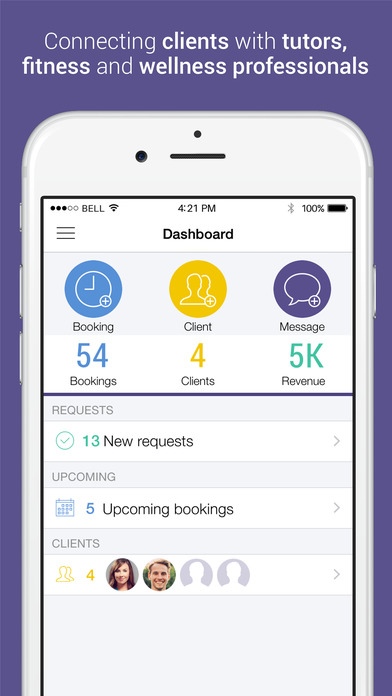
Evolir is the perfect companion for independent services providers and their clients. Manage bookings, payments, and appointments - all in one place. Stay up-to-date and get notified of any changes and new bookings. Download Evolir now and have all the tools and information you need to run your business at your fingertips. Evolir helps you connect with your existing clients and find new ones.
Our iPhone appointments app extends the functionality of Evolir and enables you and your staff to stay updated and manage upcoming appointments right from your mobile device.
Available on the Apple Watch. See all your requests and bookings on your wrist.
Evolir connects to Health App to collect and track your fitness data including Walking+Running, Steps Count, Cycling, and Flights Climbed. Health app integration only applies for clients and not providers. Clients will be prompted for fitness data permission after the second start of the app. Your fitness data is not shared.
FEATURES
Absolutely FREE
Clean dashboard - everything you need at a single glance
Complete client/provider management - leave your bulky software behind, no more pencil and paper
Beautiful booking and appointments management with a clear agenda view - your schedule has never looked better
Easy to use payments management - track your payments in one place
Fully automated push notifications and emails - never miss a beat
Dead simple in app messaging - chalk out details in seconds
CLIENTS
Find and connect with local independent service providers
Manage your schedule, track your appointments, and always be in control
Access your data securely from anywhere - your mobile device and personal computer
Should any changes in your schedule occur, our system will make sure you are always notified
Evolir - Connecting clients with tutors, fitness and wellness professionals. Download the app now and joint the growing Evolir family - it s free.
* You need a free Evolir account.
Requires iOS 8.2 or later. Compatible with iPhone, iPad, and iPod touch.
About evolir
The company that develops evolir is Dimitar Ivanov. The latest version released by its developer is 2.0.
To install evolir on your iOS device, just click the green Continue To App button above to start the installation process. The app is listed on our website since 2014-11-26 and was downloaded 0 times. We have already checked if the download link is safe, however for your own protection we recommend that you scan the downloaded app with your antivirus. Your antivirus may detect the evolir as malware if the download link is broken.
How to install evolir on your iOS device:
- Click on the Continue To App button on our website. This will redirect you to the App Store.
- Once the evolir is shown in the iTunes listing of your iOS device, you can start its download and installation. Tap on the GET button to the right of the app to start downloading it.
- If you are not logged-in the iOS appstore app, you'll be prompted for your your Apple ID and/or password.
- After evolir is downloaded, you'll see an INSTALL button to the right. Tap on it to start the actual installation of the iOS app.
- Once installation is finished you can tap on the OPEN button to start it. Its icon will also be added to your device home screen.
Program Details
System requirements
Download information
Pricing
Version History
version 2.0
posted on 2014-11-26
Disclaimer
Official App Store Link
We do not host evolir on our servers. We did not scan it for viruses, adware, spyware or other type of malware. This app is hosted by Apple and passed their terms and conditions to be listed there. We recommend caution when installing it.
The App Store link for evolir is provided to you by apps112.com without any warranties, representations or guarantees of any kind, so access it at your own risk.
If you have questions regarding this particular app contact the publisher directly. For questions about the functionalities of apps112.com contact us.
